
 Imagine you are traveling and need to send a copy of your passport to a hotel, or you need to urgently sign a confidential non-disclosure agreement (NDA) from a coffee shop.
If you use a standard document scanner app, you are likely putting your data at risk. Most popular PDF apps require an internet connection to process your files, meaning they upload your highly sensitive documents to remote cloud servers. Worse, they often demand expensive monthly subscriptions just to let you add a digital signature or set a password.
Your identity documents and private contracts belong to you. They shouldn't sit on a third-party server. Here is how you can scan, sign, and secure your PDFs entirely on your device using DocKit.
The Danger of Cloud-Based Scanning
When you snap a picture of your driver's license or tax return using a cloud-dependent app, that image doesn't just stay on your phone. It is transmitted over the network (sometimes unencrypted public Wi-Fi) to remote servers for OCR (text recognition) and PDF rendering.
This introduces three major problems:
- Data Breaches: Cloud servers are prime targets for hackers. If a scanner company's database is compromised, your passport or tax information is exposed.
- Network Dependency: If you are on an airplane, in a remote area, or have a poor cellular connection, you simply cannot process your documents.
- Hidden Costs: Because maintaining cloud servers is expensive, these apps force you into $10/month subscriptions just to access basic editing tools.
How DocKit Secures Your Workflow
We built DocKit as a "local-first" environment. That means 100% of the processing power comes from your phone's internal hardware. Whether you are scanning an ID or signing a contract, your files never leave your device unless you manually choose to share them.
1. Purpose-Built Modes for IDs and Passports
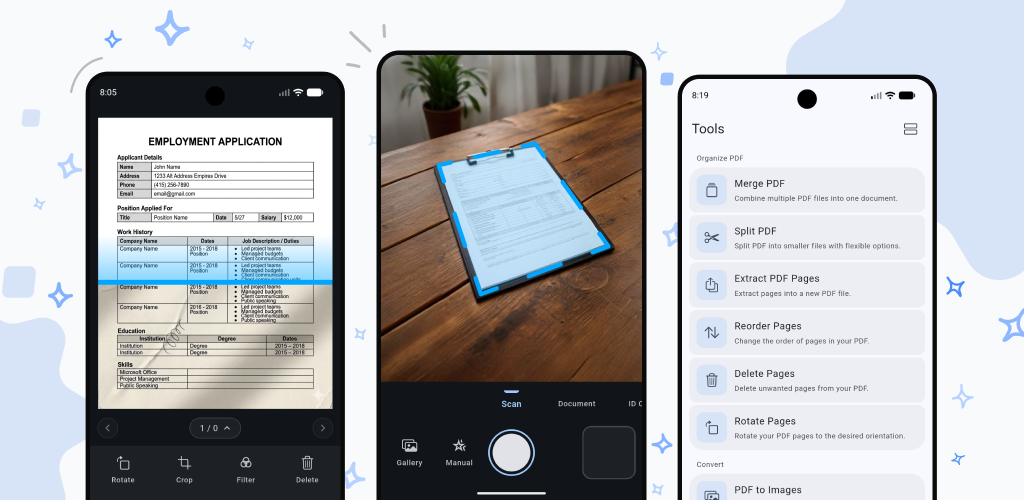
Instead of trying to manually crop a driver's license on a messy desk, DocKit offers dedicated scanning modes for sensitive documents:
- ID Card Mode: Scans the front and back of any standard ID card, automatically removes the background, and stitches both sides neatly onto a single PDF page.
- Passport Mode: Automatically detects passport dimensions, frames the page perfectly, and helps reduce the glare caused by plastic lamination.
2. Sign Documents in Seconds (No Subscription Required)
Don't pay a monthly fee just to draw your name. With DocKit, you can easily open any PDF, select the Signature tool, and securely sign your document right on your screen. Because it works offline, you can finalize contracts securely while entirely disconnected from the internet.
3. Military-Grade File Protection
Need to email a sensitive document but want to ensure only the recipient can open it? DocKit’s built-in PDF toolkit lets you Password-Protect your files locally before you hit send. You can also add custom watermarks to prevent unauthorized reuse of your documents.
Everything You Need, Zero Bloatware
DocKit isn't just a scanner; it is a complete, offline PDF toolkit designed to replace four or five different subscription apps. From a single, clean workspace, you can:
- Merge & Split: Combine multiple receipts into an expense report, or extract a single page from a massive 100-page document.
- Compress: Shrink massive PDF files to meet email attachment limits using on-device lossless compression.
- Extract Text: Instantly copy editable text from a scanned image using local Optical Character Recognition (OCR).
The Bottom Line
You shouldn't have to trade your privacy for convenience, and you shouldn't have to rent your software forever. With DocKit, you get desktop-class document management right in your pocket—completely private, lightning-fast, and always available offline.
Take Back Your Privacy Today
DocKit is available for iOS (15.0+) and Android (9.0+). The core tools are completely free forever, with zero mandatory accounts and absolutely no data harvesting.